





Choosing banner ad sizes starts with design, but the decision also affects which inventory an advertiser can access. The dimensions you prepare affect which placements can show the creative and how much room users have to see and understand it. They also determine how much inventory the campaign can access.
For crypto exchanges, blockchain products, fintech platforms, and iGaming brands, the size of the ad matters even more. A campaign may need to work inside an article, across a desktop sidebar, above the main content, or within a mobile screen. A format that works well in one placement can feel cramped or oversized in another.
No banner size is universally best. The useful format depends on the placement, device, audience, campaign objective, and available inventory. Google Ad Manager’s own size guide flags 300×250, 336×280, 728×90, and 160×600 as the formats with the deepest advertiser inventory, while something like 468×60 is stuck competing for a much thinner supply. The 970×250 billboard sits in its own category: Google treats it as a high-demand size that mostly moves through preferred deals and private auctions.
For Bitmedia advertisers, a better approach is to prepare several formats that cover the main shapes and then test how each performs.
Which banner sizes should advertisers prepare?
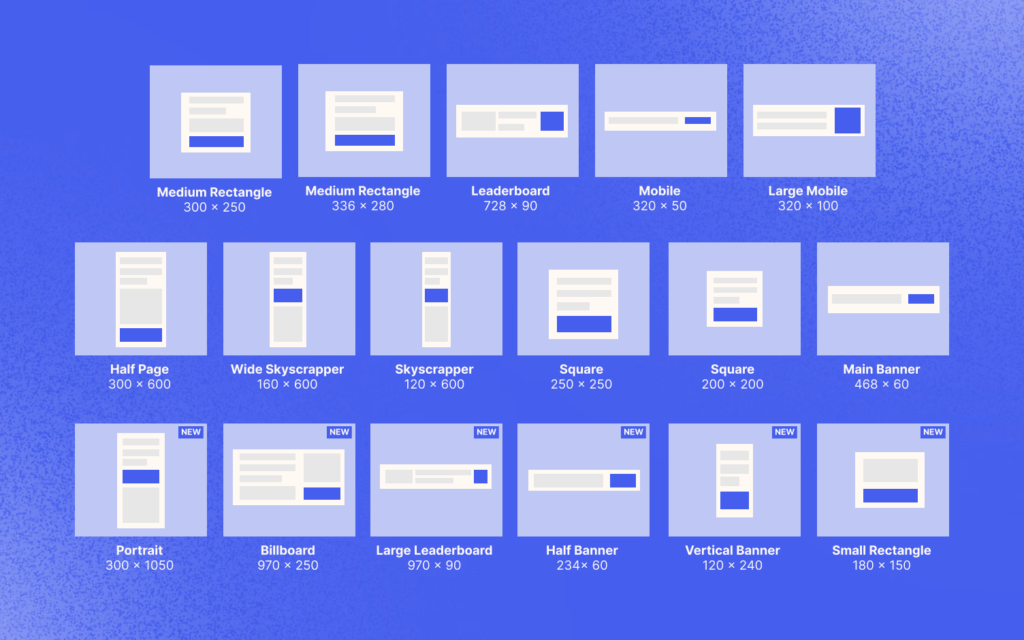
The table below shows the most widely used banner sizes organized by device and placement role.
| Size | Common name | Typical placement | Device focus | Inventory role |
| 300×250 | Medium Rectangle | Inside articles, side content, below content | Desktop + mobile web | Broad inventory |
| 336×280 | Large Rectangle | Within or around article content | Desktop + some mobile | Broad inventory |
| 728×90 | Leaderboard | Above main content, forum headers | Desktop + tablet | Broad inventory |
| 970×90 | Super Leaderboard | Wide desktop header | Desktop | Wider, high-visibility placement |
| 300×600 | Half Page | Desktop sidebar | Desktop | High-impact vertical |
| 160×600 | Wide Skyscraper | Desktop sidebar | Desktop | Broad sidebar inventory |
| 320×50 | Mobile Leaderboard | Top or bottom of mobile page | Mobile | Core mobile inventory |
| 320×100 | Large Mobile Banner | Mobile top/bottom or larger mobile slot | Mobile | More visual room than 320×50 |
The 300×250 medium rectangle is a practical starting point because it fits many content layouts. The 728×90 leaderboard works well in wide desktop positions, while 160×600 and 300×600 suit vertical sidebars.
The 320×50 and 320×100 formats are built for mobile placements. With less screen space available, the creative has to communicate the offer much faster.
The 970×250 billboard is common across the wider display market, but that does not mean every network supports it.
The available network inventory and standard banner sizes are two different things. A format can be widely used across display advertising but unavailable on a specific platform.
Bitmedia currently supports 728×90, 468×60, 125×125, 200×200, 250×250, 300×250, 300×100, 250×100, 336×280, 160×600, 120×240, 120×600, 180×150, 300×600, 320×50, 320×100, 468×90, 970×90, and 320×1200.
How banner size affects inventory and performance
Advertisers often focus on CTR or CPM when comparing formats, but the relationship is broader.
Formats with wider inventory give a campaign more opportunities to serve impressions. Bigger formats tend to grab attention simply because they take up more of the page, though premium placement usually comes at a higher cost. Where the ad sits matters just as much as its size. Something running above the fold gets seen, something buried near the bottom is competing with how far a visitor even bothers to scroll. None of those characteristics guarantees a better conversion rate.
Banner performance and inventory depend on the market as well as size. Bitmedia’s published geo data illustrates the variation. In the US, 300×250, 160×600, and 728×90 are among leading formats, while Germany shows a different mix that includes 468×60, 300×250, and 300×100.
When testing formats, look at the metrics separately:
| Metric | What to examine |
| CTR | Does the creative generate interest? |
| Conversion rate | Do clicks lead to the desired action? |
| CPA | What does each conversion cost? |
| ROAS | How much revenue comes from spend? |
CPM still matters, but it needs to be read alongside the conversion data. The useful format is the one that supports the campaign objective at an acceptable cost. A 300×600 placement might deliver a stronger CTR but carry a higher CPM. A 300×250 campaign could attract fewer clicks while producing a better CPA.
Fill rate is primarily a publisher metric. It describes how much available inventory is actually filled. Advertiser performance should be evaluated through delivery, clicks, conversions, CPA, and revenue rather than treating fill rate as a direct indicator of campaign success.
Adapting one campaign to different banner sizes
The campaign should still feel like itself in every size, even when the layout has to change. Take a crypto exchange running a lower-trading-fee promo: on a 728×90, that’s a logo, a short headline, a product shot, and a CTA all packed into one horizontal line. A 300×250 version can stack the headline, product image, and CTA vertically. A 320×50 mobile banner may need only the logo, offer, and CTA.
A mobile creative needs to be designed for its own canvas rather than treated as a reduced desktop version. On a 320×50 banner, long headlines and detailed product screenshots usually become unreadable. Design the mobile version around the available space from the start.
The same principle applies to iGaming, fintech, and blockchain campaigns. Keep the core proposition consistent, then adapt the visual hierarchy to the format.
Fixed-size banners or responsive ads?
Fixed-size image ads give advertisers direct control over the final design. They are useful when the campaign depends on a specific composition, product screenshot, or carefully positioned CTA.
Responsive ads work differently. The advertiser provides assets, and the system adapts them to available spaces. Google describes responsive display ads as formats that automatically adjust their size, appearance, and format to fit available ad spaces.
Bitmedia also supports responsive ads. Its current setup uses a 128×128 logo and a 336×178 background image, with a 200 KB maximum for each uploaded asset.
The choice depends on what the campaign needs. Fixed-size creatives give you tighter control over the final composition. Responsive assets make it easier to adapt the campaign across placements. Campaign requirements should determine which approach to use.
Banner technical requirements
For Bitmedia Image Ads, current requirements allow static JPG or PNG files up to 200 KB and animated GIFs up to 400 KB. HTML5 banners use ZIP format with a maximum archive size of 3 MB. For HTML5, the archive can contain the HTML file plus supporting JS, CSS, JPG, GIF, PNG, SVG, and font files. External network access is not allowed.
File compliance is especially important for mobile campaigns. Heavy files can create slower loading experiences, while oversized or overly complex creatives may leave less room for the message itself.
Before uploading, check each version for the correct dimensions, format, file weight, animation, and readable text.
How to test banner sizes
A practical test uses the same offer, audience, landing page, and tracking setup across several dimensions. The test mix will depend on the campaign. A useful starting set is 300×250 for desktop and mobile web, 728×90 for desktop, 160×600 for desktop, 320×50 for mobile, and 320×100 for mobile.
Track CTR to see which formats generate interest, then compare conversion rate to understand how effectively those clicks turn into the desired action. CPA shows the cost of each conversion, while ROAS shows the revenue generated from the advertising spend.
Compare formats by device and placement where possible. A campaign-wide average can hide what is actually happening in individual placements. A mobile banner may earn more clicks while a desktop format generates more valuable conversions.
Common banner ad size mistakes
Relying on a single size can reduce the inventory available for the campaign. Even a strong 300×250 creative cannot compete for placements that require 728×90 or 320×100.
Overcrowding is another common problem. A small banner has less room for copy and imagery, so every element needs a purpose.
Shrinking the desktop creative usually creates a weaker mobile ad. Text becomes too small, images lose impact, and CTAs can become difficult to notice.
The landing page has to back up whatever the banner promised. If the ad is selling a lower trading fee, a casino bonus, or a fintech signup deal, the page behind it should make that same offer obvious the moment it loads.

Related Posts